
What Is Wi-Fi Calling? How It Works and When to Use It (2026)
Wi-Fi calling routes your normal calls over Wi-Fi when the cell signal can't reach you. Here is how it works, how to turn it on, and the one address to keep updated.

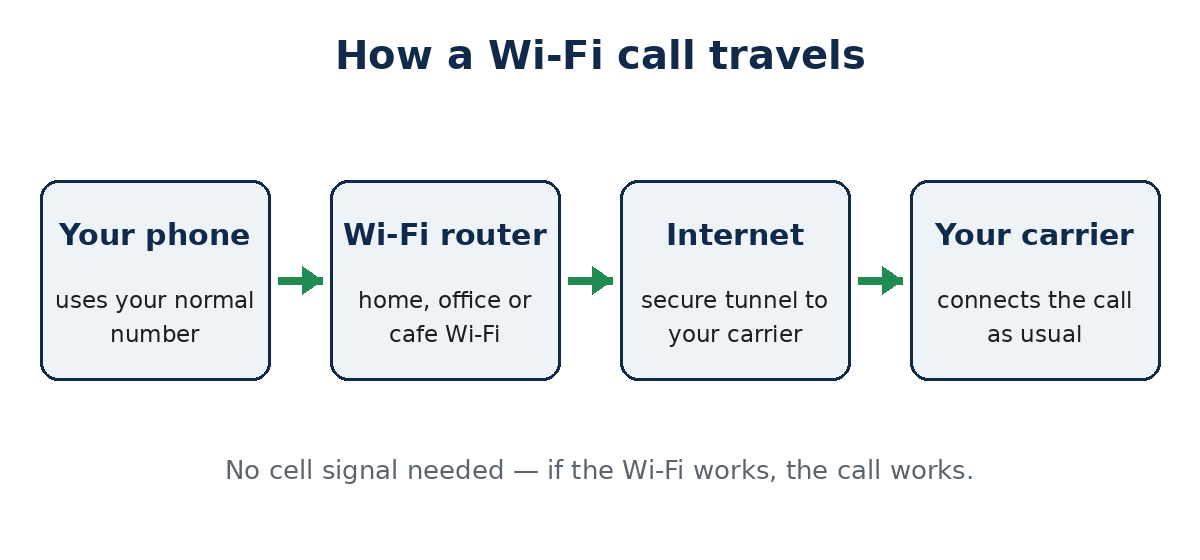
Wi-Fi calling lets your phone make and receive ordinary calls and texts over a Wi-Fi network instead of the cell network. You keep your normal number, the person you call needs nothing special, and the call counts against your regular plan. If parts of your home are a dead zone — a basement, a thick-walled apartment — it is probably the most useful setting already sitting, switched off, in your phone.
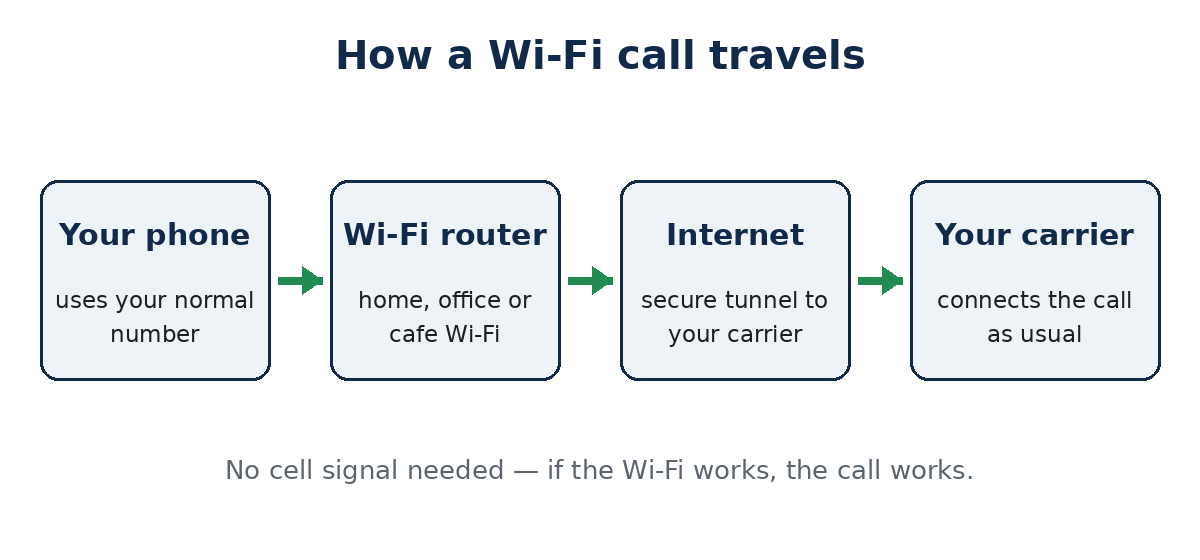
Diagram: Stack and Value (original)
What it is
Wi-Fi calling (carriers also call it VoWiFi) is a built-in carrier feature, not an app. It differs from WhatsApp or FaceTime Audio, which are separate services with their own apps. Wi-Fi calling runs through your carrier, so calls and texts on your own number work exactly as on the cell network — including to landlines and to people who have never heard of it.
Almost every recent phone supports it, and AT&T, Verizon, and T-Mobile all offer it on most plans at no extra charge. Domestic Wi-Fi calls are billed like ordinary domestic calls, using plan minutes where minutes apply. If the option is missing from your settings entirely, Google's guidance is blunt: your carrier does not support it on that device or account.
How it works
When you place a call with Wi-Fi calling on, your phone opens a secure, encrypted tunnel over the internet to your carrier, which connects the call from there. If the cell signal is weak and Wi-Fi is strong, the call goes over Wi-Fi; walk out of Wi-Fi range mid-call and most carriers hand it over to the cell network without dropping it, if that network is available.
How to turn it on
Setup takes a minute, per line on your account.
iPhone: Open Settings > Cellular (labelled Mobile Service in some regions) > Wi-Fi Calling, turn on Wi-Fi Calling on This iPhone, and tap Enable. With more than one line, pick the line first.
Samsung Galaxy: Open Settings > Connections > Wi-Fi Calling and turn the switch on.
Google Pixel: Open Settings > Network & internet > SIMs, tap your carrier SIM, then turn on Wi-Fi calling.
On all three, you may be asked to enter or confirm an emergency address before the feature activates. That step is not optional — see below.
The E911 address, and why it matters
A normal 911 call lets responders locate you from cell towers. A Wi-Fi call has no tower, so carriers must collect a registered emergency address — the E911 address — when you turn Wi-Fi calling on, and send it with any 911 call made over Wi-Fi. So keep it current: if you move, update it in the same Wi-Fi Calling settings screen, because a stale address sends help to the wrong place. Expect your phone to prefer the cell network for 911 whenever any signal exists, using Wi-Fi only as the fallback.
Wi-Fi calling vs VoLTE
These two get confused because both carry modern, high-quality voice calls for the same carrier. The difference is the road the call takes. VoLTE — Voice over LTE — carries the call over your carrier's LTE cell network. Wi-Fi calling carries the same kind of call over Wi-Fi and the internet instead. Same number, same minutes, same carrier; if the cell road is blocked and the Wi-Fi road is clear, Wi-Fi calling gets through.
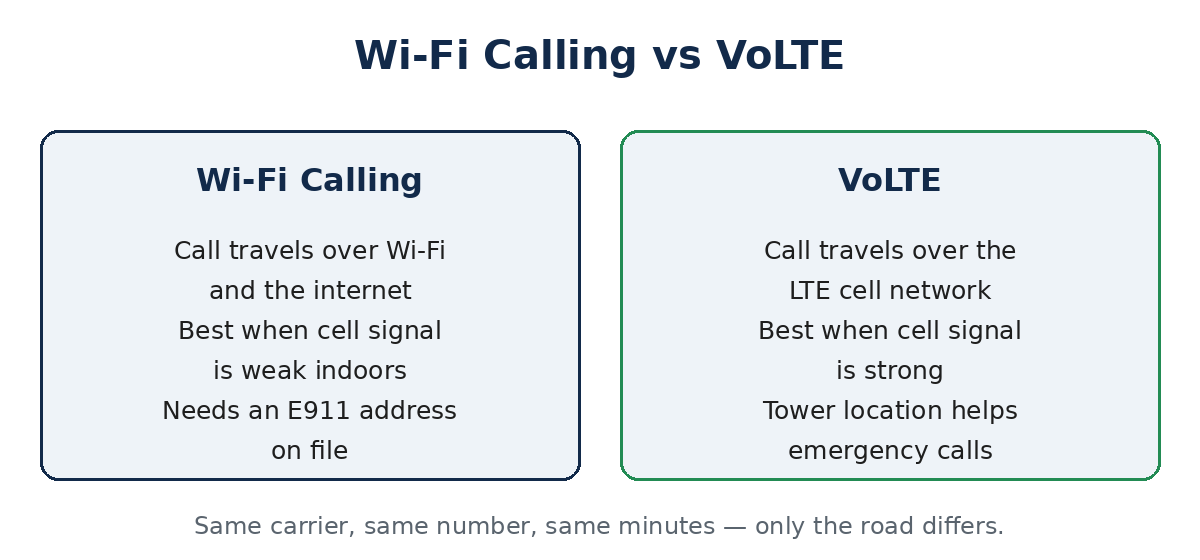
Diagram: Stack and Value (original)
When it helps — and its limits
Wi-Fi calling helps most indoors: basements, interior offices, metal-roofed buildings, and homes with one bar by the window. It can also help abroad — on many US plans, calls back to US numbers over Wi-Fi are billed as domestic calls — but treat that as a per-carrier detail, not a rule. Calls to local numbers in the country you are visiting are still international, some carriers restrict the feature in certain countries, and emergency calls abroad follow local rules, not your E911 address. Check your carrier's terms before relying on it on a trip.
The limits are the Wi-Fi itself. A congested network makes for choppy calls, public Wi-Fi with a sign-in page can block the feature, and if the power or broadband goes out, so does your phone line. It is a strong backup for weak signal — not a replacement for having any signal at all.
Bottom line
Wi-Fi calling routes your normal calls and texts over Wi-Fi when the cell signal cannot reach you, at no extra cost on the major US carriers. Turn it on, keep the E911 address current, and forget about it — your phone picks whichever path works.

Member discussion