
What Is Thunderbolt 5? Speeds, Cables, and Whether You Need It (2026)
Thunderbolt 5 doubles the speed to 80Gbps and can charge a large laptop at 240W — but only with the right laptop, accessory, and short cable. Here is what it actually changes.

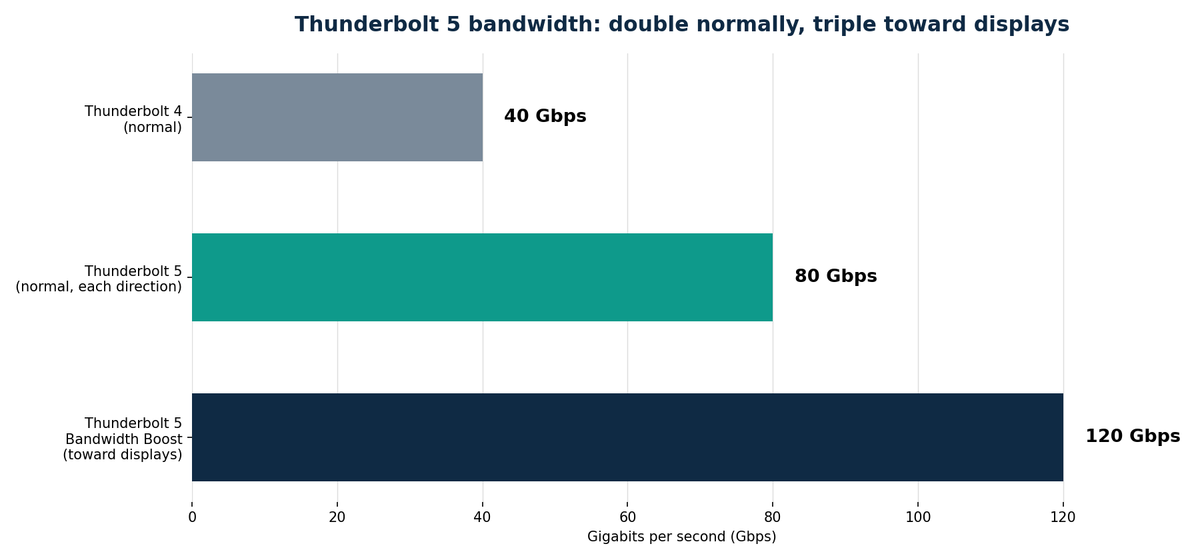
Thunderbolt 5 is the newest version of the USB-C port on higher-end laptops. It looks identical to Thunderbolt 4 and uses the same cable shape, but it doubles the normal speed to 80Gbps, can push 120Gbps toward displays, and can charge a large laptop through the same cable. Most people do not need it yet — here is how to tell if you do.
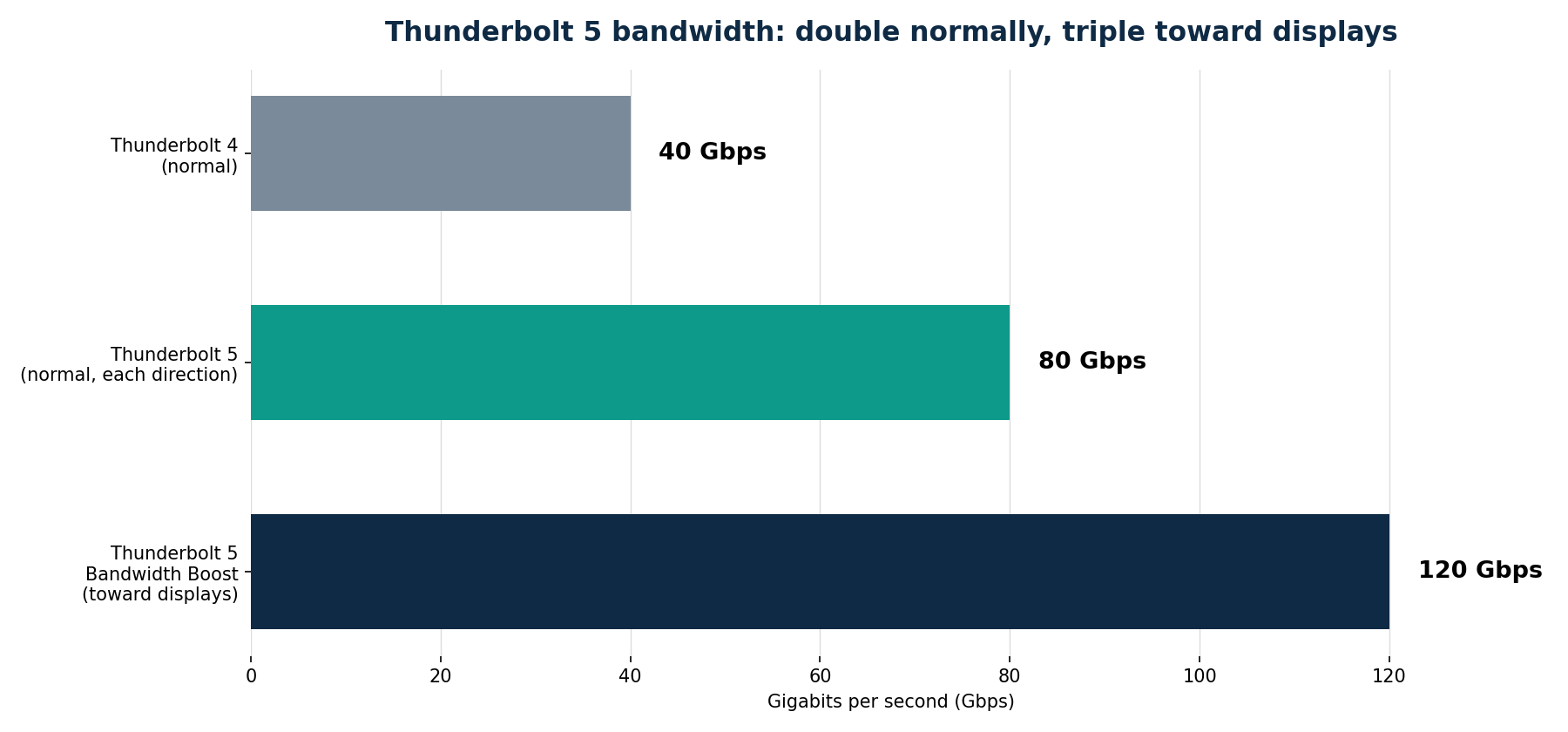
Diagram: Stack and Value (original)
What it is
Thunderbolt 5 is Intel's certified connection standard, built on USB4 Version 2.0, DisplayPort 2.1, and PCI Express Gen 4. That stack matters because USB4 v2 on its own allows a wide range of speeds — a USB4 port is not guaranteed to be fast. A Thunderbolt 5 port is: Intel certification requires the full headline features, tested. Thunderbolt 5 is fully backward compatible with Thunderbolt 4, Thunderbolt 3, and USB4 devices, which simply run at their own, slower speed.
It achieves the jump in part with PAM-3 signalling, which carries more data in each cycle than the on/off signalling older versions used.
The speeds, plainly
The normal mode is 80Gbps in each direction at the same time — symmetric, and double Thunderbolt 4's 40Gbps. That is the figure that applies to docks, storage, and everyday data.
For display-heavy work, Bandwidth Boost rebalances the same cable: up to 120Gbps toward the displays and 40Gbps back. It is not 120Gbps both ways, and you do not choose it manually — the connection uses it when the displays need it. Intel rates that setup for up to three 4K displays at 144Hz, or two 8K displays at 60Hz with compression, through DisplayPort 2.1.
Underneath, the PCIe tunnel that external drives and graphics devices use doubles from 32Gbps on Thunderbolt 4 to 64Gbps (PCIe Gen 4). That is why Thunderbolt 5 external SSD enclosures can be meaningfully faster than Thunderbolt 4 ones — provided the drive inside is fast enough to use it.
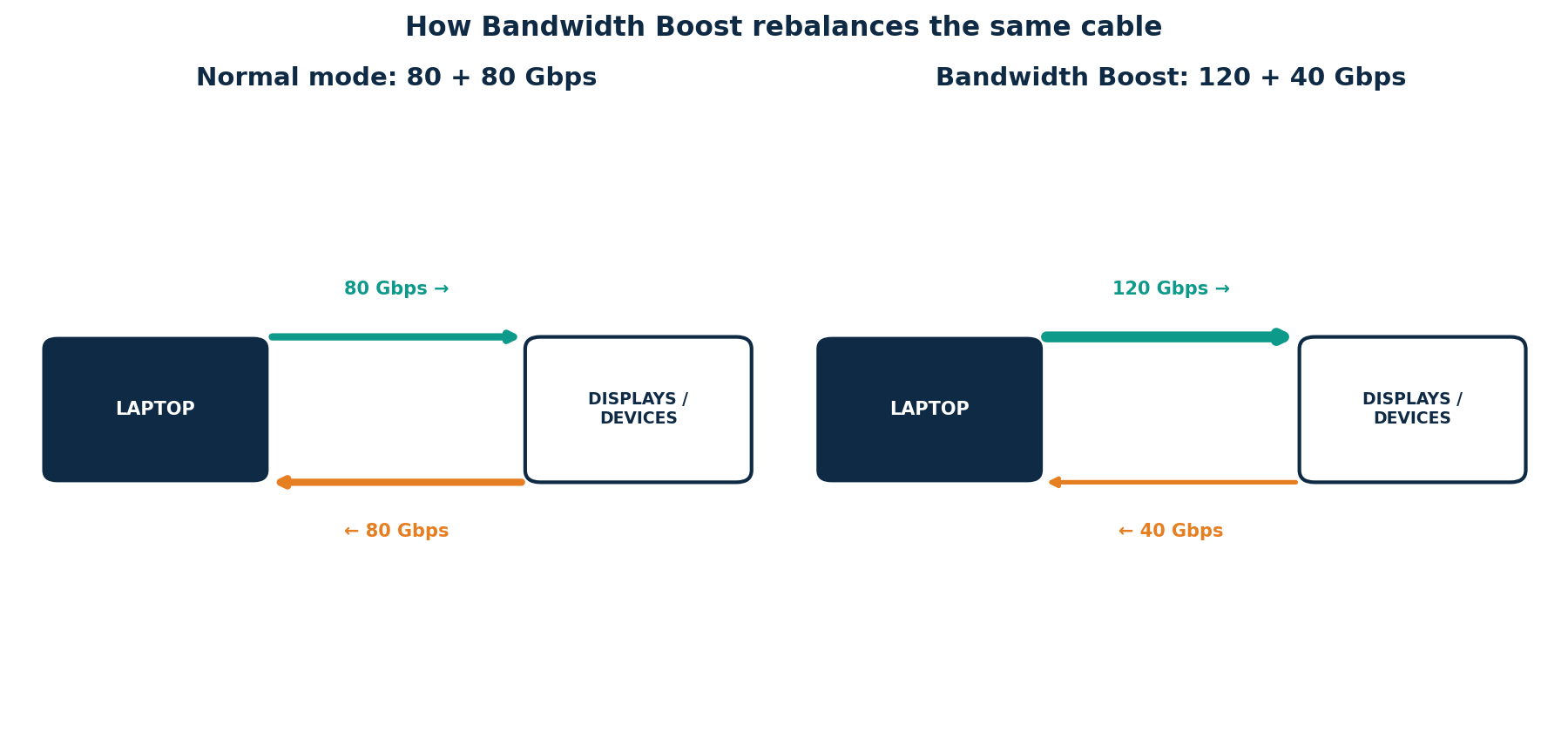
Diagram: Stack and Value (original)
Thunderbolt 4 vs Thunderbolt 5
| Thunderbolt 4 | Thunderbolt 5 | |
|---|---|---|
| Normal bandwidth | 40Gbps | 80Gbps |
| Display boost | None | Up to 120Gbps one way |
| PCIe tunnel | 32Gbps, Gen 3 | 64Gbps, Gen 4 |
| Display standard | DisplayPort 1.4 | DisplayPort 2.1 |
| Display guarantee | Two 4K at 60Hz | Three 4K at 144Hz |
| Charging | Up to 100W | Up to 240W; 140W minimum for hosts |
Charging uses USB Power Delivery 3.1 Extended Power Range. The practical change is not your phone — it is that a dock can now properly power many 16-inch and gaming laptops, which often need more than Thunderbolt 4's 100W, over the one cable that also carries displays and data. The actual wattage still depends on the laptop, dock, and cable.
Cables: the 0.8-metre rule
A port alone does not give you Thunderbolt 5 speed. For full 80Gbps, use a certified Thunderbolt 5 cable, and keep it short: passive Thunderbolt 5 cables are sold at 0.8 metres for full speed. A longer, uncertified, or plain USB-C charging cable will still plug in and work, but usually at USB or Thunderbolt 4 speeds, with no warning on screen. If a new dock or drive seems slow, the cable is the first thing to check — and a Thunderbolt 4 cable in a Thunderbolt 5 setup caps the whole chain at Thunderbolt 4.
Which laptops have it in 2026?
Still a minority, and mostly at the top end. On Apple's side: MacBook Pro models with M4 Pro, M4 Max, M5 Pro, or M5 Max, the Mac mini with M4 Pro, and Mac Studio models with M4 Max or M3 Ultra. Base-chip M4 and M5 Macs have Thunderbolt 4 instead. On Windows, look for select premium and gaming laptops with Intel Core Ultra Series 2 processors plus a separate Thunderbolt 5 controller — Intel's Barlow Ridge chip — including some Razer, Lenovo, and MSI models. Because that controller is an add-on rather than built into most processors, two laptops with the same chip can differ, so check the port specification for the exact model, not just the processor name.
Do you need it?
Probably not if you use one 4K monitor, a normal dock, and an ordinary external drive — Thunderbolt 4 already handles that comfortably, and everything you own will keep working in a Thunderbolt 5 port. It starts to be worth paying for if you run two or three high-refresh displays, move very large files to a fast external SSD, or want one cable to fully power a large workstation laptop at a desk. Buy it for a setup you have, or one you are buying now — not as future-proofing on its own.
Bottom line
Thunderbolt 5 doubles Thunderbolt 4 to 80Gbps, boosts to 120Gbps toward displays, doubles PCIe to 64Gbps, and raises charging to 240W, all on the same USB-C shape. Check that both ends — laptop and accessory — and a short certified cable support it before expecting those numbers.


Member discussion