
What Is HDR? HDR10, HDR10+, and Dolby Vision Explained (2026)
HDR10, HDR10+ and Dolby Vision compared in plain English — static vs dynamic metadata, licensing, and why a cheap HDR TV may not show real HDR.

HDR stands for High Dynamic Range. On a TV, it means a wider gap between the darkest and brightest parts of the picture, and a wider range of colour, than standard video. Sunlight can look bright without washing out, while detail in a dark room stays visible instead of turning black.
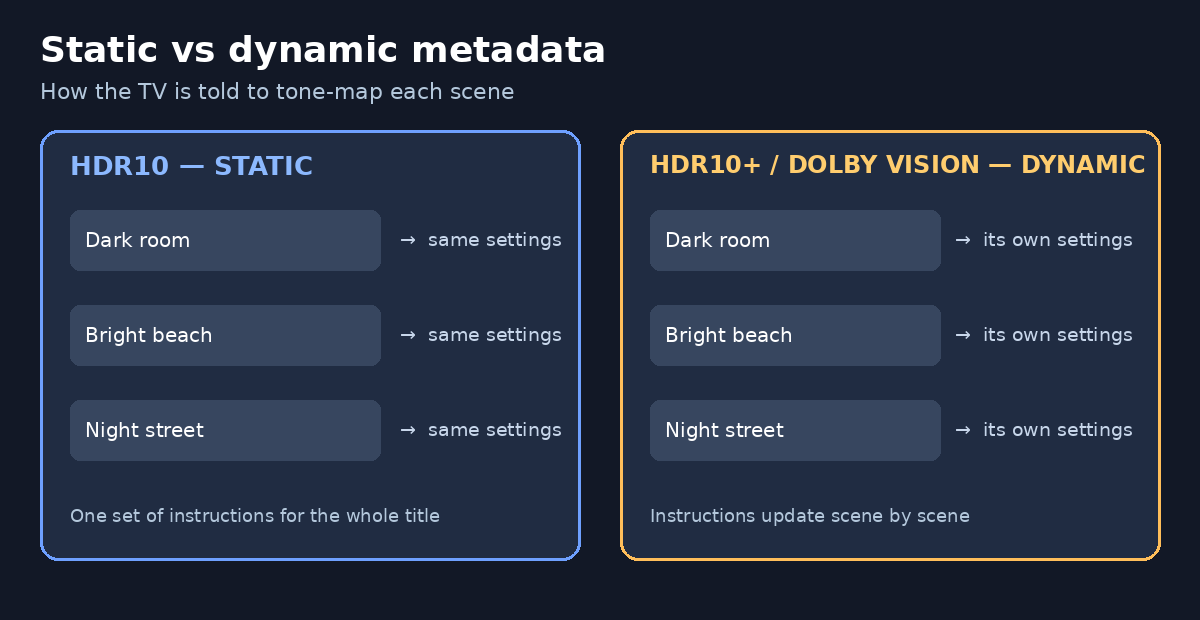
Diagram: Stack and Value (original)
What it is
Regular SDR video was built for older TVs, at roughly 100 nits. A nit is a unit of brightness — higher means brighter. HDR content is mastered much brighter, commonly at 1,000 nits or more, and uses 10-bit colour instead of 8-bit, so gradients such as a sunset sky change more smoothly.
No home TV shows that full range exactly as mastered. Instead, it tone-maps it: it fits highlights and shadows into what its panel can do. How well it does that is where the formats differ.
The three formats
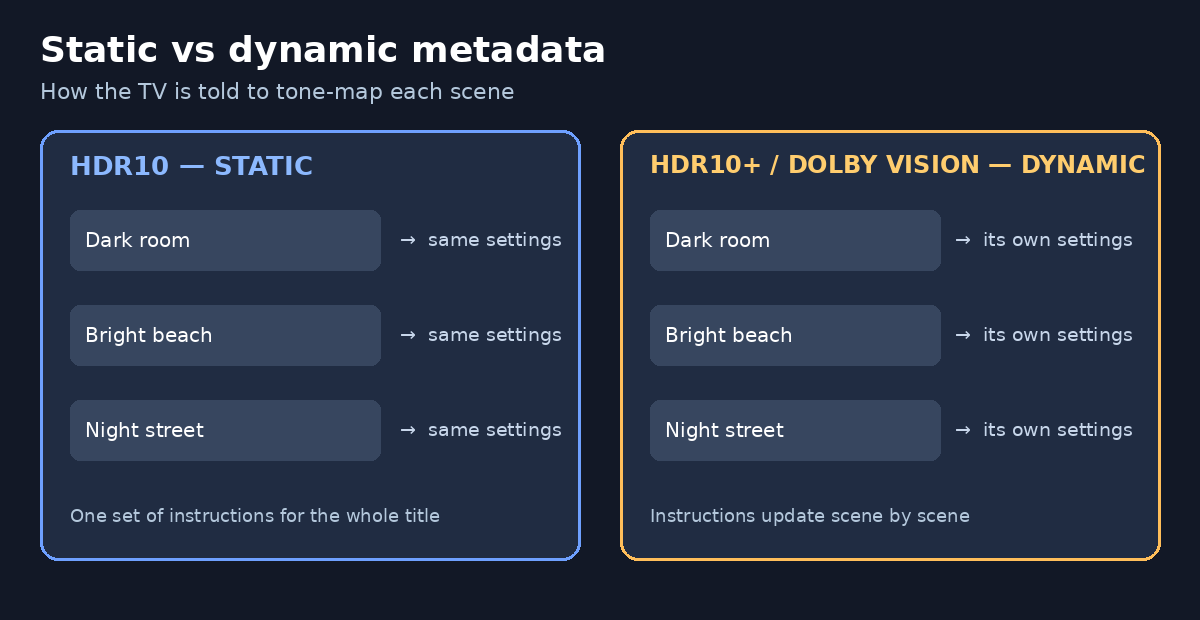
HDR10 is the baseline. It is open and royalty-free, and almost every HDR TV, console, streamer, and 4K disc supports it. It uses static metadata — one set of brightness information for a whole film. If the brightest moment is a 4,000-nit explosion, that value guides the whole title, even dark scenes that never get near it.
HDR10+ adds dynamic metadata to the same foundation. Instructions change scene by scene, so a dark interior and a bright beach are each tone-mapped on their own terms. It is royalty-free for content, though device makers pay a small administration fee. Backed most strongly by Samsung, it appears most often on Prime Video. Samsung TVs support HDR10+, not Dolby Vision.
Dolby Vision also uses dynamic metadata, scene by scene and sometimes frame by frame. It is Dolby's licensed format, so makers pay to include it — one reason cheap TVs often skip it. It supports up to 12-bit colour and mastering up to 10,000 nits, although streaming versions are usually 10-bit and no consumer TV reaches 10,000 nits. It is common on Netflix, Disney+, and Apple TV+, and on many LG, Sony, TCL, and Hisense TVs.
| Format | Metadata | Licensing | Typical support |
|---|---|---|---|
| HDR10 | Static, whole title | Open, royalty-free | Almost every HDR TV and service |
| HDR10+ | Dynamic, scene by scene | Royalty-free for content | Samsung TVs, Prime Video |
| Dolby Vision | Dynamic, scene by scene | Licensed from Dolby | Most other major brands, major streamers |
Why it matters
Dynamic metadata helps most on TVs that are not extremely bright. A bright TV has headroom to spare, so static tone mapping does less damage. A mid-range TV has to compromise, and per-scene instructions help it keep highlight detail without making dark scenes look dull. Panel brightness, local dimming, and tone mapping usually matter more than the logo on the box.
What you need
Three things have to line up. First, the TV must support the format — check the specific model, not just the brand. Second, the source must deliver it: a streamer, console, or disc player that outputs HDR. Third, the content and, for streaming, your plan tier must include it. Several services reserve 4K HDR, and Dolby Vision in particular, for higher tiers, and the same show may be Dolby Vision on one service and HDR10 on another. If any link falls back, you still get a picture — just in HDR10 or SDR.
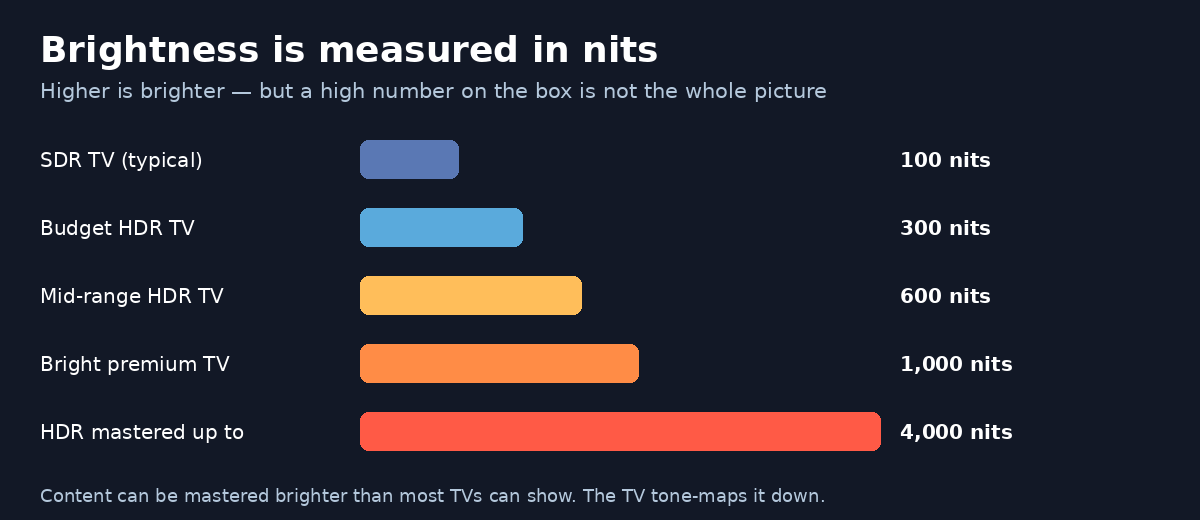
Diagram: Stack and Value (original)
Common confusion
The biggest trap is "fake" HDR: a low-cost TV that accepts an HDR signal but cannot really show it. If a panel only reaches around 300 nits, has no effective local dimming, and lacks a wide colour range, HDR can look dimmer than SDR. Accepting HDR10 is not the same as displaying HDR well. Do not chase nits alone — sustained brightness, black levels, and processing decide most of what you see.
Bottom line
HDR10 is the universal starting point. HDR10+ and Dolby Vision add dynamic instructions that help capable TVs tone-map more accurately. Dolby Vision has the widest premium streaming support and HDR10+ is Samsung's alternative — but either only helps if your TV is bright enough, and your source and plan deliver it.




Member discussion