What Is Cloud Gaming? GeForce NOW, Xbox Cloud Gaming, and Luna Explained (2026)
Cloud gaming runs the game in a data centre and streams it to a phone, laptop or TV you already own. Here is how it works, what internet it needs, and how the main services differ.

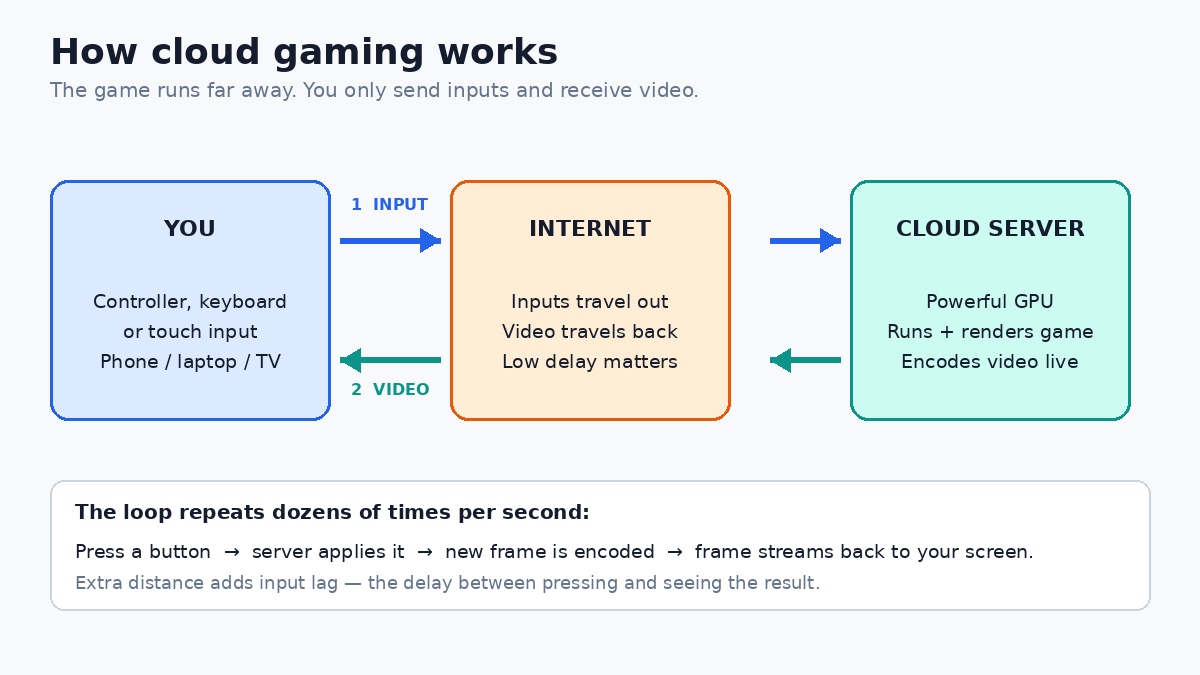
Cloud gaming means playing a game that runs on a powerful computer in a data centre, not on the device in front of you. Your phone, laptop, or TV shows a live video stream and sends your controller presses back over the internet. Think Netflix for games, except it has to react instantly — that difference explains both the appeal and the problems.
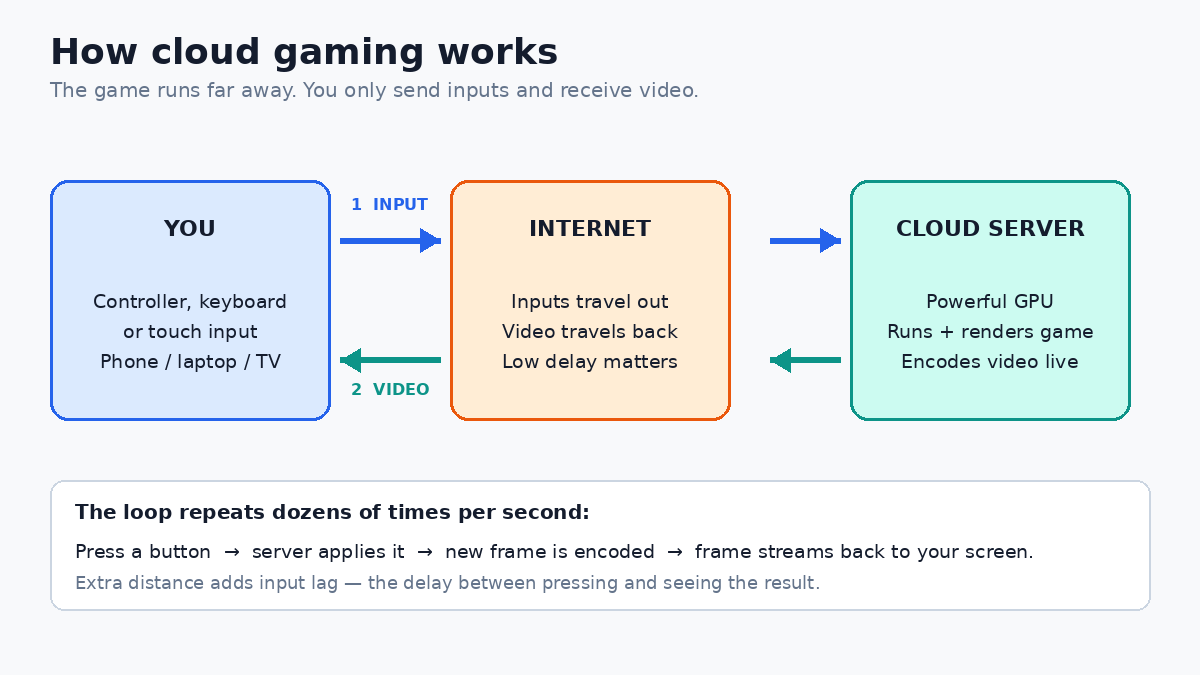
Diagram: Stack and Value (original)
How it works
When you press play, the service starts the game on a server with a strong graphics processor (GPU). A loop then repeats dozens of times per second:
- You press a button or move a stick.
- That input travels over the internet to the server.
- The server applies it, renders the next frame, and encodes it as video.
- The video streams back, and your device decodes and displays it.
Your device is mainly decoding video, so it needs no gaming GPU, large download, or much storage. The trade-off is time: the total delay is called input lag or latency, measured in milliseconds (ms). A game cannot buffer ahead like a film — that would make controls feel even later — so it streams almost live.
What you need
You need a supported device and app or browser, a controller, and a fast, stable internet connection.
Speed sets the picture quality you can sustain. NVIDIA lists 15 Mbps for GeForce NOW at 720p at 60 frames per second, 25 Mbps for 1080p at 60 fps, and 45 Mbps for 4K at 120 fps. Microsoft lists 10 Mbps as a minimum for Xbox Cloud Gaming, with 20 Mbps for best performance on larger screens. PlayStation lists 5 Mbps minimum and 15 Mbps for 1080p; Amazon lists at least 10 Mbps for Luna at 1080p. Leave headroom on top for everyone else in the house.
Latency matters as much as speed. NVIDIA requires less than 80 ms to a data centre, and NVIDIA and Microsoft both recommend wired Ethernet or 5 GHz Wi-Fi. Distance raises latency, and variation in delay — jitter — causes stutter. Hours of streamed video also use a lot of data, so watch any cap.
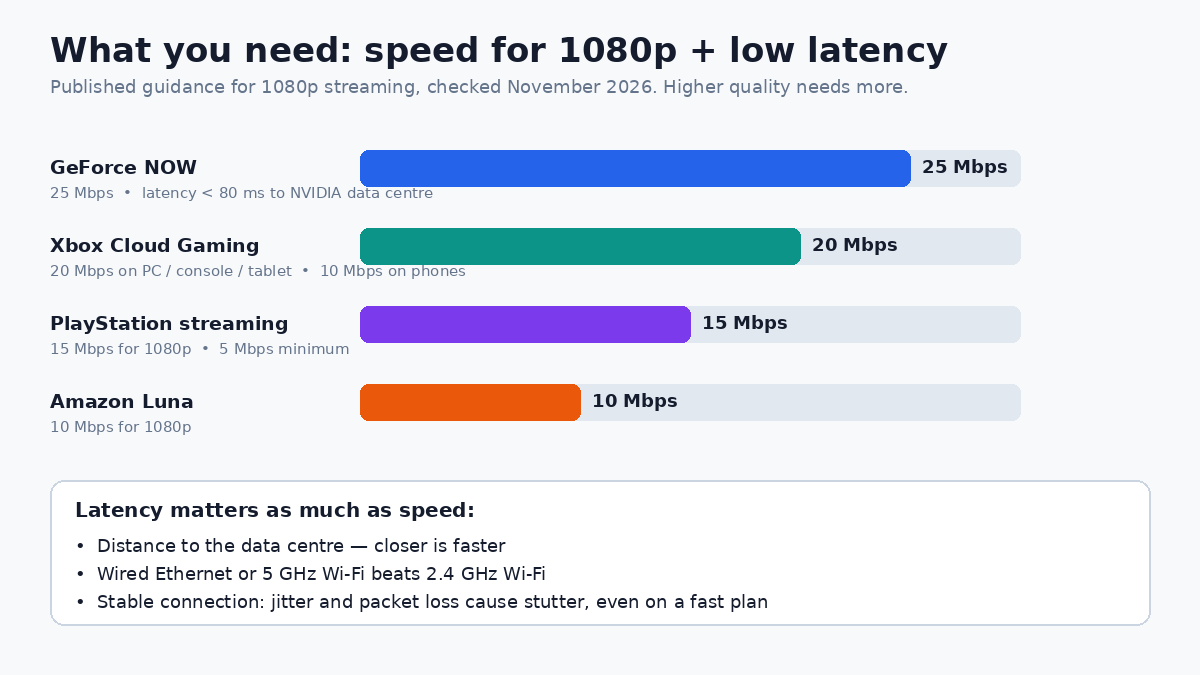
Diagram: Stack and Value (original)
The main services
The services differ mainly in how you get games: bringing your own library, or browsing an included catalogue.
GeForce NOW (NVIDIA)
GeForce NOW streams PC games you already own on supported stores such as Steam and the Epic Games Store — it includes no library by itself. Its Free, Performance, and Ultimate tiers step up session length, priority, and resolution, with Ultimate aimed at 4K. Check current details first: limits and monthly playtime caps changed in 2026.
Xbox Cloud Gaming (Microsoft)
Xbox Cloud Gaming streams Xbox games to phones, tablets, PCs, consoles, TVs, and browsers. Access is tied to Xbox Game Pass: Microsoft now lists monthly cloud playtime included with Game Pass plans — the most with Ultimate — plus purchasable playtime. You can stream Game Pass titles, select games you own, and supported free-to-play games. Check your plan on xbox.com, as hours vary.
Amazon Luna
Luna, running on Amazon Web Services (AWS), is Amazon's service. Luna Standard is included with an eligible Prime membership, with a rotating library and GameNight party games; Luna Premium is a paid upgrade with a larger library. It plays on Fire TV, browsers, phones, and tablets at up to 1080p, in a limited list of countries only.
PlayStation cloud streaming (Sony)
Sony folds cloud streaming into PlayStation Plus Premium, its top Plus tier. Premium members can stream select PS5 games and Game Catalogue and Classics Catalogue titles to a PS5 or PlayStation Portal, with no download. It suits PlayStation owners, not players wanting a cross-platform PC or phone service.
Cloud gaming vs downloading vs discs
Downloading puts the whole game on your hardware, with the lowest input lag and offline play for single-player titles after any required update — but you wait for a large download, give up storage, and need powerful hardware. A disc is similar once installed, with a copy you can lend or resell where allowed, though many discs still need large updates.
Cloud gaming removes the download and the powerful hardware — you start in moments and can switch screens — but you always depend on the internet, quality rises and falls with your connection, and a removed game leaves no copy to fall back on.
Who it's for / limitations
Cloud gaming suits players who want to try games without buying hardware, play on a weak laptop or TV, or sample a title before downloading it. Slower-paced adventures, RPGs, strategy, and turn-based games forgive the extra latency best.
It is a weaker fit for competitive shooters and fighting games, for slow, unstable, or capped internet, and for anyone far from a data centre. Libraries rotate and availability changes, so test a free tier first — how it feels at your address matters more than any headline speed.
Bottom line
Cloud gaming trades local hardware for internet quality: the game runs in a data centre, you stream the video, and latency decides whether it feels responsive or laggy. GeForce NOW is the bring-your-own-library option, Xbox Cloud Gaming the Game Pass option, Luna the Prime-included option, and PlayStation streaming the Premium-tier extra. On a fast, stable connection near a data centre, it is genuinely convenient. Otherwise, downloading still feels better.

Member discussion