
What Are Bluetooth Audio Codecs? LDAC, aptX, AAC and SBC Explained (2026)
SBC, AAC, aptX, LDAC and LC3 decide how your wireless music actually sounds. What each codec does, what your phone supports, and how to check yours.

Two pairs of earbuds can cost the same, connect to the same phone, and still sound noticeably different. One reason is an invisible piece of software called a Bluetooth audio codec. Here is what codecs do — and which ones are worth caring about.
What a codec is
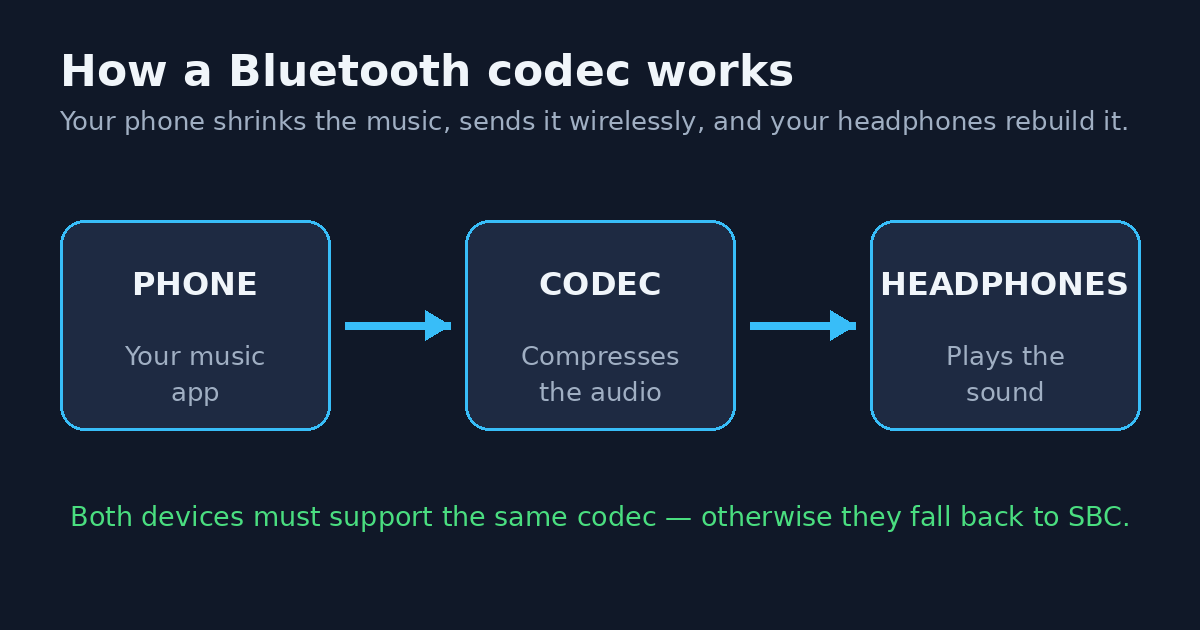
A Bluetooth audio codec is the format your phone uses to shrink music down small enough to send wirelessly, which your headphones then expand back into sound. CD-quality audio runs at about 1,411 kilobits per second (kbps) — too much data for Bluetooth to carry raw — so the phone compresses it first, using the codec as the recipe.
One rule matters more than any spec: both devices have to support the same codec. Phone and headphones pick the best codec they share when they connect, and fall back to SBC if they share nothing better. A fancy codec on only one side does nothing.
Why codecs matter
- Sound quality. Higher bitrates can carry more detail, so less of the recording is thrown away.
- Latency. Every codec adds delay, typically 100–250 milliseconds — unnoticeable in music, but enough to make sound lag behind the picture in games and video.
- Battery and stability. Pushing more data takes more power and a stronger signal. The highest modes are the first to stutter in a crowded station or airport.
The main codecs, in plain English
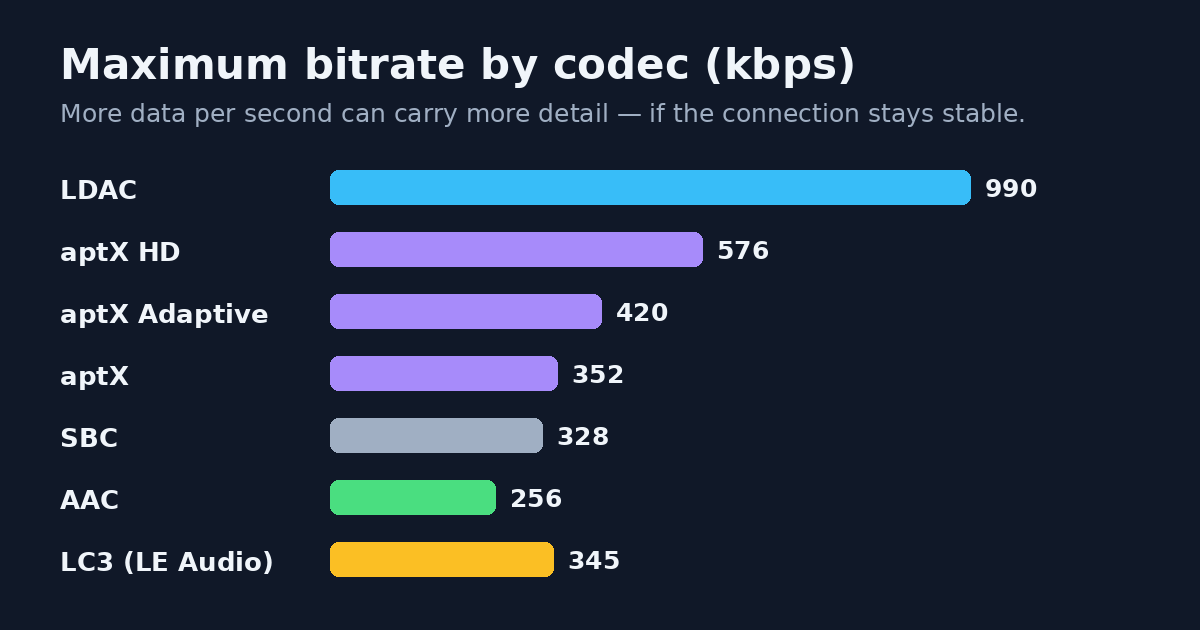
| Codec | Max bitrate | Plain-English summary |
|---|---|---|
| SBC | ~328 kbps | The universal fallback every Bluetooth device supports. Fine, rarely great. |
| AAC | ~256 kbps | Very efficient — less data, well used. The iPhone standard. |
| aptX | ~352 kbps | Qualcomm's Android staple: a solid step up from SBC, with lower latency. |
| aptX HD | ~576 kbps | aptX with 24-bit audio for more headroom. Less common in earbuds. |
| aptX Adaptive | ~279–420 kbps | Adjusts bitrate on the fly to balance quality, stability, and low latency for games. |
| LDAC | 330 / 660 / 990 kbps | Sony's high-bitrate option, built into Android since version 8. The 990 kbps mode sounds best but is fragile. |
| LC3 | Variable, efficient | The newer codec for Bluetooth LE Audio: good quality at low bitrates, lower power, and support for Auracast broadcast audio. Still rolling out. |
Bitrate is not the whole story. AAC discards sounds you are unlikely to hear, so it can sound better than its number suggests — while LDAC's top mode only helps if your music files are high quality and the connection holds.

What your devices actually support
- iPhone, iPad, and Mac: SBC and AAC only. Apple devices do not support aptX or LDAC, so AAC is the ceiling — and a good one. Paying extra for LDAC headphones for an iPhone buys nothing on codec.
- Android: SBC, AAC, and LDAC on most phones (LDAC is built into Android 8 and later). aptX depends on the phone and chipset — common on Snapdragon models, not universal.
- Windows 11: SBC and AAC as standard, aptX on some PCs, and LE Audio with LC3 on newer hardware. Windows 10 does not support AAC.
How to check or change your codec
On iPhone there is nothing to change — iOS picks AAC automatically. On Android, connect your headphones, enable Developer options (Settings > About phone, tap Build number seven times; on Samsung, under About phone > Software information), then open Settings > System > Developer options and find Bluetooth Audio Codec. Choose from the options your headphones support — the rest are greyed out. For LDAC, the nearby playback-quality setting trades the top 990 kbps mode for a more stable lower one. On Windows, there is no picker; the connection is negotiated for you.
Bottom line
The best codec is the best one your phone and headphones share. iPhone owners already get it automatically with AAC. Android owners with LDAC or aptX headphones get the most from matching gear — and for gaming or calls, a low-latency option like aptX Adaptive or LE Audio matters more than raw bitrate. Check the spec sheet for both devices before you pay extra for a codec logo.

Member discussion